
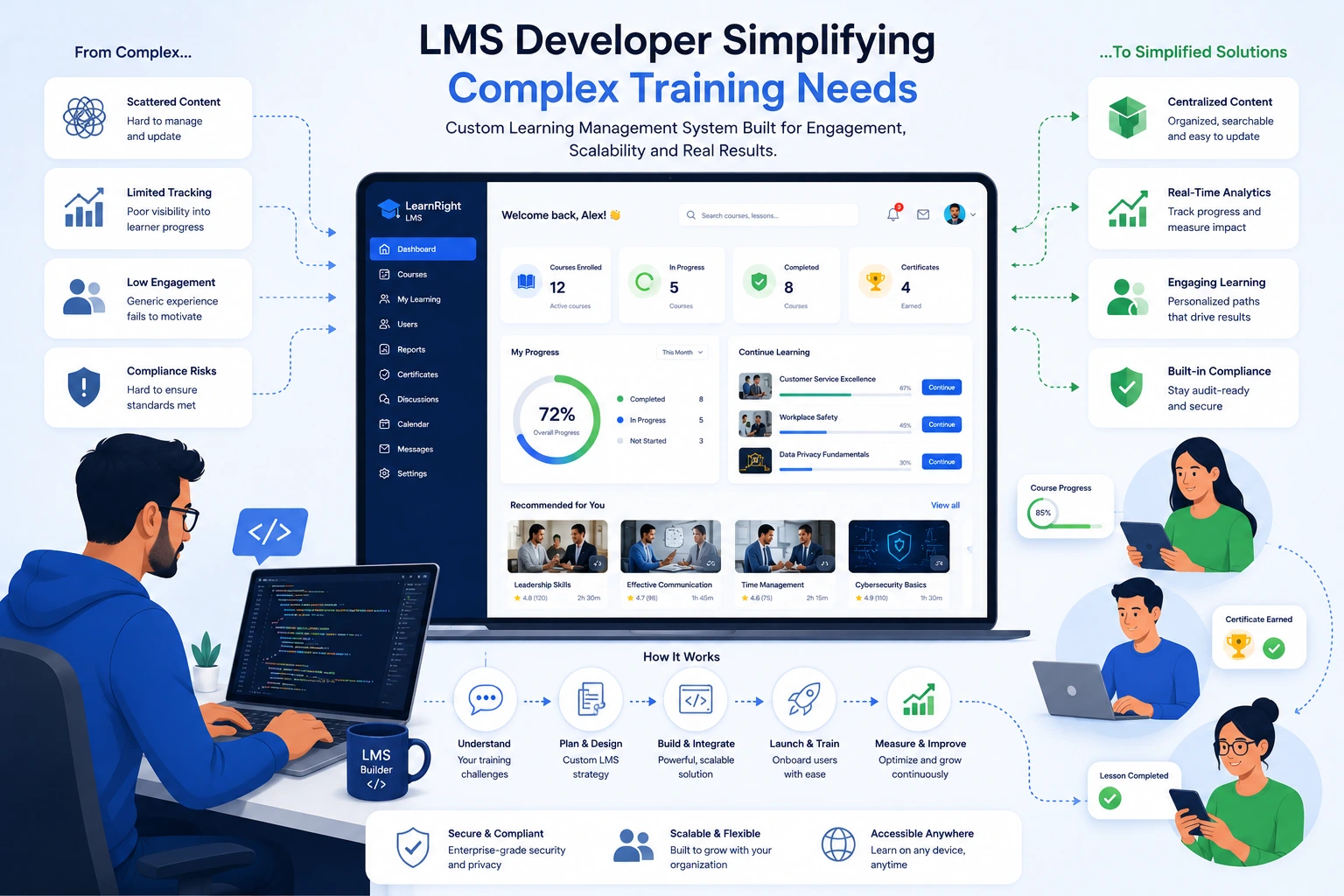
I’ve spent years building and optimizing digital learning platforms for organizations of all sizes. One thing I see repeatedly is how complex training needs—compliance requirements, skill gaps across departments, onboarding for remote teams—can quickly become a headache. The right LMS developer changes that completely.
A good learning management system (LMS) doesn’t just store courses. It organizes, delivers, and measures learning in ways that actually work for both administrators and learners. As someone who’s developed custom solutions, I’ve learned that the real value comes from making the complicated feel simple.
In this post, I’ll share practical insights from real projects on how an LMS developer can transform messy training demands into efficient, scalable programs. Whether you’re a business owner, training manager, or just exploring options, you’ll walk away with actionable ideas.
What Makes Training Needs So Complex?
Modern organizations face scattered training requirements. You might need compliance modules that update yearly, technical skills training for different roles, customer education programs, and soft skills workshops—all while tracking progress across global teams.
Traditional methods like classroom sessions, shared drives, or basic PDFs create chaos. Content gets outdated, tracking is manual, and engagement drops.
This is where a skilled LMS developer steps in. They design learning management systems that centralize everything, automate repetitive tasks, and adapt to real user needs. Instead of fighting the system, your team actually uses it.
Core Benefits of Working with an LMS Developer
Custom learning content management system work goes far beyond installing off-the-shelf software. Here’s what I’ve consistently seen deliver results:
- Centralized control: All materials in one secure place with version control.
- Personalized paths: Learners receive relevant content based on role, progress, or performance.
- Better engagement: Interactive elements, gamification, and mobile access keep people coming back.
- Actionable analytics: Real data on completion rates, knowledge gaps, and ROI instead of guesswork.
One client, a mid-sized SaaS company, had training spread across Google Drive, Zoom recordings, and Notion pages. After a custom LMS build, completion rates jumped and support tickets related to processes dropped noticeably. The system handled everything from new hire onboarding to advanced certification tracks.
How Custom LMS Solutions Drive Business Impact
Organizations using well-built learning management systems see clear returns. Studies and my own projects show cost reductions of 25-60% compared to traditional training, plus major time savings on administration.
A strong LMS supports monetization too. Many of my clients now offer training as a revenue stream—paid certifications, partner academies, or customer onboarding portals. Platforms like Thinkific or Kajabi prove the model works, but custom development lets you match your exact branding and workflows.
For service-based businesses, an internal LMS strengthens team capabilities and reduces external training spend. The long-term impact is a more competent, consistent workforce that drives growth.
Step-by-Step: How an LMS Developer Builds a Solution
Here’s the practical process I follow when tackling complex training needs:
- Discovery and Goal Setting — Meet with stakeholders to map current pain points, required content, user personas, and success metrics. No assumptions.
- Requirements and Architecture — Define features like SCORM compliance, integrations (HRIS, CRM, payment gateways), mobile responsiveness, and reporting needs.
- Content Strategy — Break complex topics into digestible modules. Use videos, quizzes, interactive scenarios, and microlearning where it fits.
- Development and Customization — Build or extend the core LMS with needed functionality. I often work with WordPress-based solutions for flexibility or custom stacks for advanced needs.
- Testing and Launch — Rigorous user testing with real learners, then phased rollout with training for admins.
- Iteration — Monitor usage data and refine based on feedback. The best systems improve over time.
This structured approach prevents scope creep and delivers a platform that actually gets used.
Common Mistakes and Troubleshooting Tips
Even experienced teams run into issues. Here are pitfalls I’ve helped clients avoid or fix:
- Overloading with features — Start simple. Add advanced tools only after validating core needs.
- Ignoring mobile experience — A huge portion of learning happens on phones. Test thoroughly across devices.
- Poor content organization — Use clear navigation, search, and tagging. Confusing interfaces kill adoption.
- Skipping change management — Train your team and communicate benefits. Technology alone doesn’t drive usage.
- Neglecting updates — Plan for ongoing maintenance, especially compliance content.
If engagement is low post-launch, check analytics for drop-off points and simplify those sections. Integration problems often trace back to data mapping—double-check early.
For WordPress users exploring LMS plugins or custom builds, the official WordPress resources offer a great starting point.
FAQ: LMS Development for Training Needs
What exactly does an LMS developer do?
An LMS developer designs, builds, and maintains learning management systems tailored to specific organizational needs. This includes backend functionality, user interfaces, content integration, and analytics.
How long does it take to develop a custom LMS?
Simple solutions can launch in weeks using existing platforms. Fully custom builds with unique features typically take 3–6 months, depending on scope. Phased delivery helps get value faster.
Is a custom LMS better than SaaS options?
It depends. SaaS platforms like LearnWorlds work well for many. Custom development shines when you need deep integrations, specific branding, or unique workflows that standard tools don’t support easily.
How do I measure success after implementation?
Track completion rates, learner feedback, knowledge retention (via assessments), time-to-competency, and business outcomes like reduced errors or faster onboarding.
Can an LMS handle compliance training effectively?
Yes. Modern systems excel here with automated reminders, version control for policies, audit trails, and certificates. This is one area where good development pays off quickly.
What technical skills should I look for in an LMS developer?
Strong experience with web technologies, database design, API integrations, and understanding of learning standards like SCORM or xAPI. Practical project examples matter more than any single stack.
Wrapping Up: Make Training Work for You
Complex training needs don’t have to stay complicated. A capable LMS developer can build a learning management system that saves time, improves outcomes, and scales with your business.
If you’re tired of fragmented training efforts and ready for something that actually works, let’s connect. Whether you need a full custom build, optimization of your current setup, or guidance on the best path forward, I help organizations turn learning challenges into strengths.






