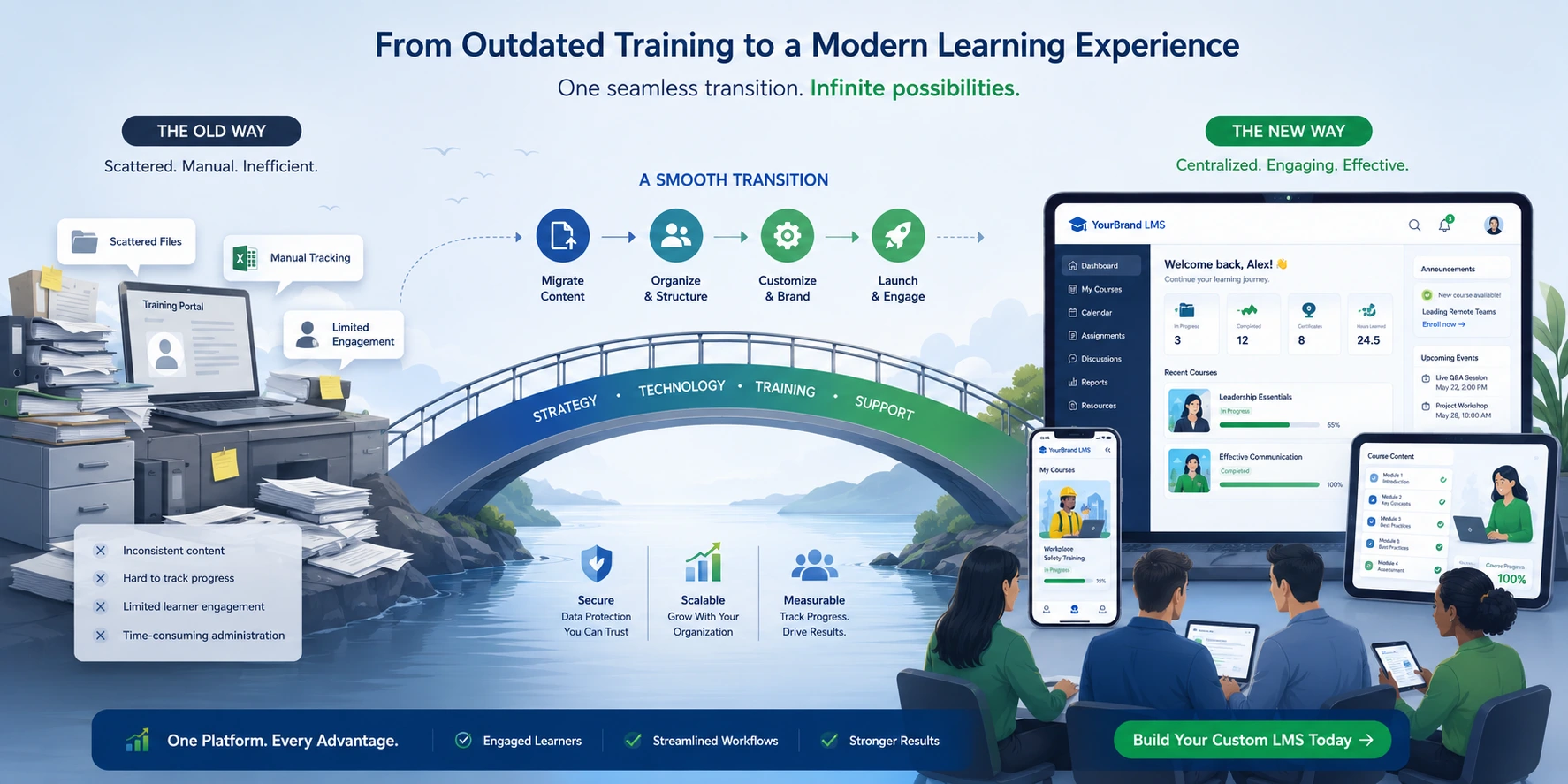
I’ve helped dozens of coaches, consultants, and small teams move their training from scattered PDFs, Zoom sessions, and basic platforms into something more professional and scalable. The shift to a custom LMS (learning management system) isn’t just a tech upgrade—it’s about owning your learning content management system and creating a better experience for both you and your students.
If you’re outgrowing generic tools or want tighter branding and data control, this guide walks you through the process based on what actually works. No theory, just practical steps I’ve seen deliver results.
Why Move to a Custom LMS in the First Place
Many training programs start simple. You use what’s available—maybe a membership site or an off-the-shelf platform. Over time, limitations appear: clunky student tracking, limited design options, high monthly fees that don’t scale, or poor integration with your existing tools.
A custom LMS solves these by letting you build (or heavily customize) a learning content management system around your specific workflows. You control the branding, user journey, certifications, and data.
From my experience working with creators, the biggest wins come in retention and monetization. Students stay longer when the platform feels professional and tailored. Plus, you stop paying per-user fees that eat into profits as your audience grows.
Custom LMS vs Off-the-Shelf Platforms: A Quick Comparison
Before diving in, let’s look at the trade-offs. I’ve evaluated many options for clients.
| Aspect | Off-the-Shelf (e.g. Thinkific) | Custom LMS |
| Setup Time | Fast | Longer upfront |
| Cost | Recurring subscriptions | Higher initial, lower long-term |
| Customization | Limited templates | Full control |
| Integrations | Good but capped | Seamless with your stack |
| Data Ownership | Shared | Complete |
| Scalability | Good for most | Excellent for complex needs |
Platforms like Thinkific or LearnWorlds work great for beginners. But once your training program involves unique certifications, advanced analytics, or specific compliance needs, a custom approach shines.
Real-World Impact: One Client’s Transition Story
Last year, a fitness coach I worked with ran her program across Teachable and Google Drive. She had 800 students but spent hours manually tracking progress and chasing payments. After transitioning to a custom LMS built on her existing site infrastructure, completion rates jumped 35% in three months. Students loved the clean, branded experience, and she regained full control over her email lists and data. Revenue became more predictable because everything lived in one owned system.
This isn’t unique. Many creators I’ve advised report similar gains once they stop fighting platform limitations.
Step-by-Step: How to Transition Your Training Program
Here’s the practical process I recommend. Take it one phase at a time.
- Audit Your Current Setup List every piece of content, user data, progress records, and integrations. Decide what to migrate, archive, or rebuild. Be ruthless—old outdated modules often need refreshing anyway.
- Define Your Requirements What must your learning management systems handle? Mobile access, drip content, quizzes, certificates, payment integrations, community features? Write these down clearly. This prevents scope creep later.
- Choose Your Foundation For many, starting with WordPress offers flexibility. Combine it with learning plugins or custom development. Alternatives like Webflow work for more design-heavy builds. Evaluate based on your tech comfort level.
- Plan the Migration Export content from your old platform. Most good tools have built-in exporters. Map user data carefully—emails, progress, and enrollments are critical. Test small batches first.
- Build and Customize Develop or configure the core features. Focus on user experience: intuitive navigation, fast loading, and mobile responsiveness. This is where your custom LMS starts feeling like “yours.”
- Test Thoroughly Run a pilot group through the new system. Fix bugs, gather feedback, and adjust. Check everything from enrollment flows to certificate generation.
- Launch and Train Users Communicate the change clearly to students. Provide simple guides or a quick onboarding video. Monitor support tickets closely in the first weeks.
- Monitor and Optimize After launch, track key metrics: completion rates, engagement, and technical performance. Iterate based on real usage.
Common Mistakes and Troubleshooting Tips
Transitioning isn’t always smooth. Here are issues I’ve seen repeatedly:
- Underestimating data migration: Old formats don’t always transfer cleanly. Solution: Clean data before moving and use professional help if volumes are high.
- Ignoring user training: Students resist change. Over-communicate benefits and offer support.
- Going too custom too soon: Start with core features. You can add advanced ones later.
- Neglecting mobile experience: A huge portion of learning happens on phones. Test rigorously on different devices.
- Poor backup strategy: Always maintain access to the old system until the new one proves reliable.
If you run into integration issues, check documentation first or consult specialists. I often point clients toward established resources when needed.
Frequently Asked Questions
How long does it take to transition to a custom LMS?
For most small-to-medium programs, expect 4–12 weeks depending on content volume and complexity. Simple moves go faster.
Is a custom LMS expensive?
Upfront costs are higher than plug-and-play options, but many see ROI within 12–18 months through better retention and lower recurring fees.
Can I migrate progress and certificates?
Yes, in most cases. It requires careful mapping but is very doable with proper planning.
Do I need coding skills?
Not necessarily. Platforms like WordPress with good plugins can get you far. For truly custom features, you may need a developer.
What if my audience is small?
Start simpler. Many grow into custom solutions gradually. Test the waters with a hybrid approach first.
Ready to Own Your Learning Experience
Transitioning your training program to a custom LMS gives you freedom that generic learning management systems simply can’t match. You build deeper student relationships, protect your data, and create a platform that grows exactly as your business does.
If you’re serious about leveling up your online training, the effort pays off. I’ve seen it transform programs from side hustles into sustainable businesses.
Ready to get started? Check out my work at Shihab Morshed or explore practical digital solutions at Digital Wind IT. Feel free to reach out—I help creators make these transitions smoother every day.
What’s holding your training program back right now? Drop a comment or send a message. Let’s make your learning content management system work better for you.