I’ve spent years helping creators, coaches, and small businesses launch and scale online courses. One truth stands out: without solid analytics, your learning management system is just a fancy content holder. With the right data, it becomes a growth engine that actually improves results over time.
In this post, I’ll walk you through how analytics turn ordinary LMS platforms into truly data-driven ones. You’ll see real benefits, practical steps I’ve used with clients, common pitfalls, and how to avoid them. If you’re running courses on platforms like WordPress, Webflow, or dedicated tools, this will help you make smarter decisions.
What Makes an LMS Data-Driven?
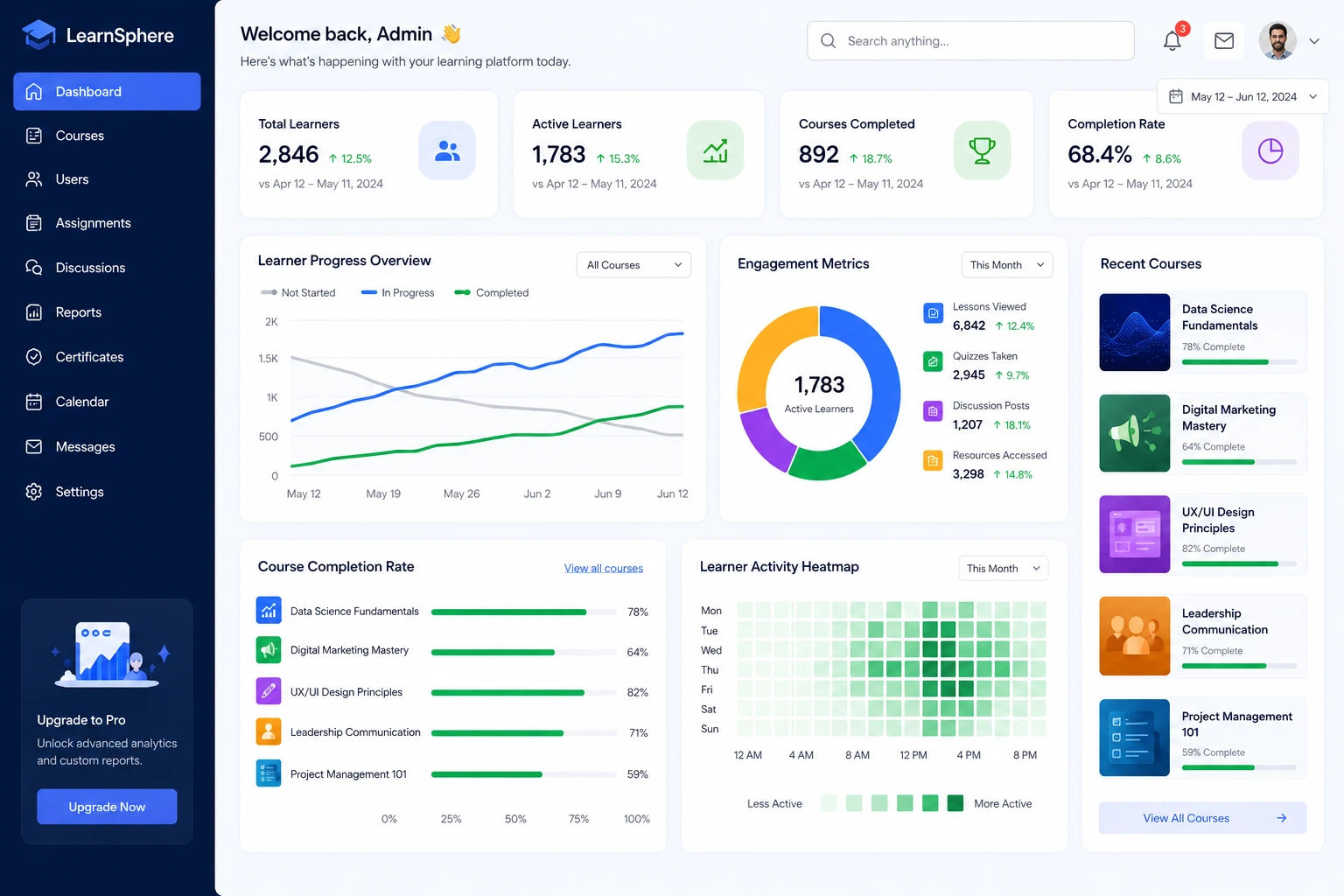
A data-driven learning management system collects, analyzes, and acts on learner data in real time. It’s not just tracking who logged in—it’s understanding why someone dropped a module, how long they spent on a video, and what content leads to better outcomes.
Learning analytics give you visibility into engagement patterns, completion rates, assessment scores, and even time-to-proficiency. Instead of guessing what works, you get evidence. Modern LMS platforms have moved far beyond basic reports. They now offer dashboards that highlight trends and suggest improvements.
From my experience building course sites, the shift to data-driven approaches often doubles effective engagement within a few iterations.
Key Benefits of Analytics in Learning Management Systems
Analytics deliver concrete advantages that directly impact your bottom line and learner satisfaction.
First, you improve learner engagement. When you see which lessons hold attention and which cause drop-offs, you can fix weak spots quickly. One client discovered a 40-minute video had an average watch time of just 8 minutes. We shortened and chunked it, and completion rates jumped.
Second, personalized learning becomes possible. Data shows individual progress, allowing adaptive paths—recommending extra resources for struggling learners or advanced modules for fast movers.
Third, you prove training ROI. Linking course data to business results (like higher client retention after a sales training) makes it easier to justify investments or sell more courses.
According to various industry reports, organizations using strong LMS analytics see 15-25% higher completion rates. That’s a massive difference when scaling programs.
How Analytics Drive Business Impact and Monetization
For course creators and businesses, LMS data isn’t just educational—it’s strategic.
You can identify top-performing content and promote it more aggressively. Or spot popular topics to create upsells and advanced programs. In one project, analytics revealed high demand for a specific module. We turned it into a standalone mini-course, adding a nice revenue stream.
Data-driven decisions also reduce wasted effort. Instead of creating content blindly, you focus where it matters. This is especially valuable for solopreneurs or small teams managing multiple courses.
External platforms like Thinkific emphasize how analytics help creators understand what resonates, leading to better retention and referrals.
Step-by-Step: Implementing Analytics in Your LMS
Here’s a practical process I’ve followed multiple times:
- Define your goals first. Decide what success looks like—higher completion rates, better quiz scores, or increased course sales? Clear goals prevent data overload.
- Choose or configure the right tools. If you’re on WordPress, plugins like those from LearnDash or MemberPress offer solid reporting. Dedicated platforms provide more advanced dashboards. Check options that integrate well with your site.
- Set up key tracking. Focus on metrics like course progress, time spent, completion rates, drop-off points, and feedback scores. Enable event tracking for video interactions if possible.
- Review and analyze regularly. Block time weekly to check dashboards. Look for patterns rather than isolated numbers.
- Act on insights and measure again. Update content based on findings, then track if changes improved results. Iterate.
- Integrate with other data. Connect LMS analytics to email tools or sales data for a fuller picture.
This loop turns your learning management system into a continuously improving machine.
For hands-on help building or optimizing your site, explore my services at Digital Wind IT or check my personal work at ShihabMorshed.com.
Common Mistakes and Troubleshooting LMS Analytics
Even with good tools, people trip up. Here are frequent issues I’ve seen:
- Collecting data but never acting on it. Reports sit unused. Set reminders to review and assign action items.
- Focusing on vanity metrics. Total logins look nice but don’t tell you much. Prioritize completion rates, engagement depth, and learning outcomes.
- Ignoring context. A low completion rate might mean the course is too hard, too easy, or poorly marketed. Always pair numbers with qualitative feedback.
- Overcomplicating dashboards. Start simple. Add advanced filters only when needed.
- Privacy concerns. Be transparent about data use and comply with regulations like GDPR.
Troubleshooting tip: If reports seem off, double-check tracking setup. Test as a learner yourself to verify data flows correctly.
FAQ: Analytics in Learning Management Systems
What is learning analytics in an LMS?
It’s the process of collecting and analyzing data from learner activities to improve courses and outcomes.
Which metrics matter most in a data-driven LMS?
Key ones include course completion rates, average time spent, assessment scores, drop-off points, and engagement indices.
How do analytics support personalized learning?
They reveal individual strengths, weaknesses, and preferences, enabling tailored content recommendations and paths.
Can small course creators benefit from LMS analytics?
Absolutely. Even basic insights help refine content and boost sales without needing big teams.
How do I get started with analytics if my current LMS lacks them?
Consider migrating to a stronger platform or adding plugins. Tools like LearnWorlds offer robust built-in analytics.
Does analytics really improve ROI for online courses?
Yes. By identifying effective content and fixing weak areas, you increase retention, completions, and ultimately revenue.
Building Better Learning Experiences with Data
Analytics transform learning management systems from static repositories into dynamic, responsive platforms. They help you create courses that truly serve learners while supporting your business goals.
If you’re serious about growing your online education efforts, start small with key metrics and consistent review. The results compound quickly.
Ready to build or optimize your own data-driven LMS? Reach out through Digital Wind IT for custom solutions, or browse resources on my site. Let’s make your courses more effective together.