
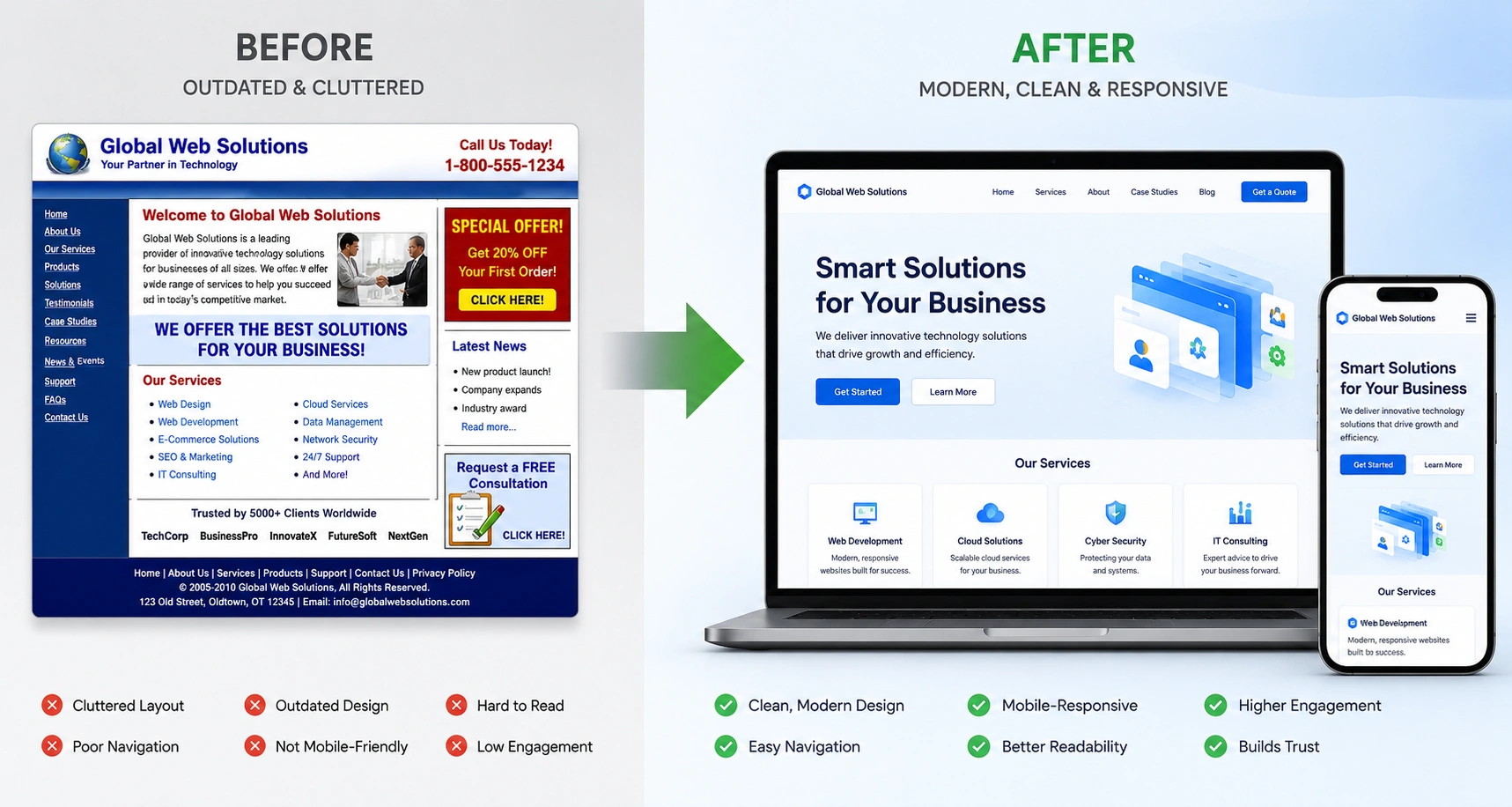
A few years ago, I helped a local business owner whose website looked straight out of 2012. Visitors bounced within seconds, especially on mobile. After a proper redesign focused on responsive web design, their traffic nearly doubled and leads improved significantly. If your site feels outdated, slow, or broken on phones, you’re not alone. Many business owners face the same challenge.
In this guide, I’ll walk you through exactly how to transition your old website to a modern design. You’ll learn practical steps, what to watch out for, and how website redesign services can make the process smoother. Whether you run a small business or personal brand, these insights come from real projects I’ve handled.
Why Responsive Web Design Matters More Than Ever
Responsive web design isn’t just a nice-to-have — it’s essential. Google prioritizes mobile-friendly sites in search results. If your website doesn’t adapt to different screen sizes, you’re losing visitors before they even read your content.
From my experience, old fixed-width designs frustrate users. Buttons are too small to tap, text is hard to read, and images load slowly. Modern responsive web design solves this by using flexible grids, media queries, and scalable elements that adjust automatically.
Websites design company professionals see the same pattern repeatedly: businesses that upgrade see better engagement and lower bounce rates. One client reported a 45% increase in time on site after switching to a fully responsive layout.
The Business Impact of a Modern Website Redesign
A dated website doesn’t just look bad — it hurts your bottom line. Slow load times and poor navigation drive potential customers straight to competitors.
In one project, I worked with an e-commerce store stuck on an old platform. After implementing website redesign services focused on speed and user experience, their conversion rate jumped from 1.8% to over 4%. Mobile sales, which previously barely registered, became a major revenue driver.
Modern design also builds trust. Clean typography, fast loading, and intuitive navigation signal professionalism. Whether you sell services or products, first impressions matter.
Key Benefits of Upgrading to Responsive Web Design
- Better User Experience: Visitors can browse comfortably on phones, tablets, or desktops.
- Improved SEO: Google loves fast, mobile-friendly sites.
- Higher Conversions: Easier navigation leads to more inquiries and sales.
- Future-Proofing: Your site stays relevant as new devices emerge.
- Brand Consistency: Modern aesthetics strengthen your professional image.
Step-by-Step: How to Transition Your Old Website
Here’s the practical process I follow with clients when delivering website redesign services.
- Audit Your Current Site Start by reviewing what works and what doesn’t. Use tools like Google PageSpeed Insights and mobile testing. Note broken links, slow pages, and outdated content. Document your goals — more leads, better branding, or easier updates?
- Define Your Goals and Audience Decide what success looks like. Are you targeting mobile users heavily? Do you need e-commerce features? Map user journeys for your ideal visitor.
- Choose the Right Platform Consider migrating to WordPress for flexibility or Webflow for advanced design control without heavy coding. WordPress.org remains popular for its ecosystem of themes and plugins. For more designer-friendly options, check Webflow.
- Design and Develop the New Site Create wireframes and mockups first. Focus on clean layouts, fast loading, and responsive web design principles. Work with a websites design company if you need custom development.
- Migrate Content and Test Thoroughly Move pages, images, and SEO settings carefully. Test on multiple devices and browsers. Use tools like BrowserStack for broader testing.
- Launch and Monitor Go live with a proper redirect plan (301 redirects). Monitor analytics for issues and make quick fixes.
Common Mistakes and Troubleshooting Tips
Many transitions fail because of avoidable errors. Here are the biggest ones I’ve seen:
- Skipping Mobile Testing: Always test on real devices, not just browser resize.
- Ignoring SEO During Migration: Set up redirects properly or you’ll lose search rankings.
- Overloading with Features: Keep the first version focused. You can add complexity later.
- Poor Content Migration: Don’t copy-paste everything. Audit and update old text and images.
If your new site feels slow after launch, optimize images, enable caching, and use a good hosting provider. For navigation issues, simplify menus and add clear calls-to-action.
Real-World Example: I helped a coach transition from a static HTML site to a modern WordPress setup. The old site had almost no mobile traffic. After redesign, mobile visits grew to 65% of total traffic within three months. His booking inquiries increased steadily.
Comparison: Old Design vs Modern Responsive Design
| Aspect | Old Fixed Design | Modern Responsive Design |
| Mobile Experience | Poor, zoomed-out views | Seamless adaptation |
| Load Speed | Often slow | Optimized and fast |
| SEO Performance | Weak | Strong (Core Web Vitals) |
| Maintenance | Difficult | Easier with modern tools |
| Conversion Rate | Lower | Typically 2-3x higher |
FAQ
How long does a website redesign take?
Most projects take 4–12 weeks depending on complexity. Simple sites can move faster.
How much do website redesign services cost?
Prices vary widely. Basic responsive redesigns start around a few thousand dollars, while complex custom projects cost more. A good websites design company will provide clear scoping.
Should I redesign or just update my current site?
If your site is very outdated or on an old platform, a full redesign usually delivers better results long-term.
Will my SEO rankings drop during transition?
Temporary dips can happen, but proper redirects and on-page optimization minimize impact. I always recommend monitoring closely after launch.
Can I handle this myself or should I hire professionals?
If you’re comfortable with code and design, you can manage smaller updates. For best results and time savings, working with experienced website redesign services is often smarter.
What if I’m using a platform like Shopify or Kajabi?
Many modern platforms support responsive themes. You can still modernize without a full migration.
Ready to Modernize Your Website?
Transitioning your old website to responsive web design is one of the highest-ROI moves you can make for your online presence. It improves user experience, boosts SEO, and helps your business grow.
If you’re ready to stop losing visitors to a dated design, I’d be happy to help. Check out my personal site or explore services at Digital Wind IT for more insights into professional web solutions.
What’s holding your current website back? Drop a comment or reach out — let’s build something better together.






