
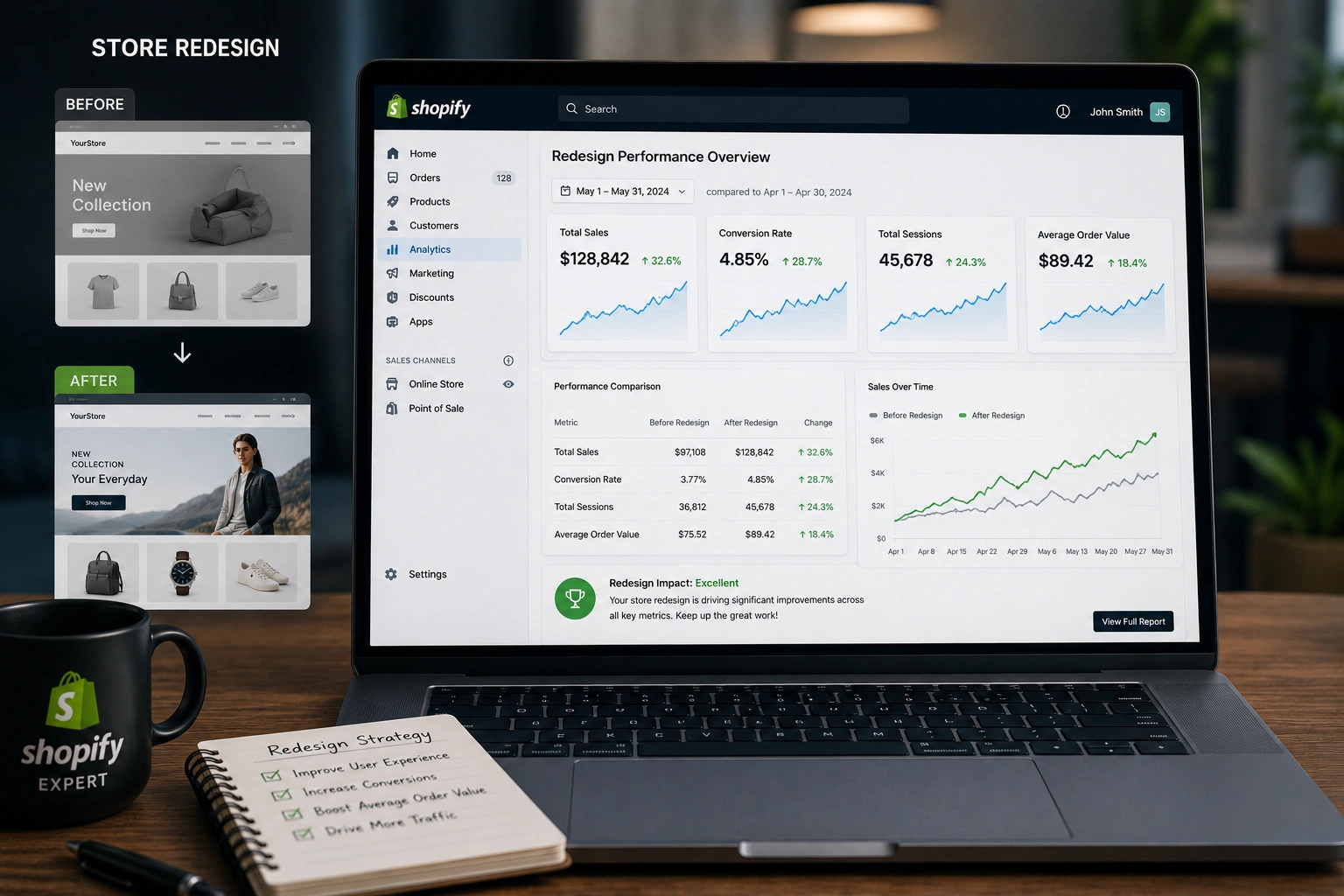
I’ve redesigned dozens of Shopify expert stores over the years, from simple dropshipping setups to more established brands needing solid Shopify support. Every time, the same question comes up: “How do we know if it actually worked?”
A redesign isn’t just about prettier fonts or a fresh layout. It’s about moving the needle on real business results. In this post, I’ll walk you through exactly how I measure success as a Shopify Expert, using practical metrics, tools, and lessons from real projects. Whether you’re running a Shopify dropshipping store or need ongoing Shopify support, these steps will help you avoid guesswork and make data-driven decisions.
Why Measuring Redesign Success Matters More Than You Think
Many store owners launch a redesign, feel good about the new look, and then… nothing changes. Traffic might stay flat. Sales don’t jump. That’s usually because they didn’t set clear benchmarks beforehand or track the right things afterward.
From my experience, a well-measured redesign can deliver 30-100%+ lifts in key areas. One client saw their conversion rate jump significantly after we simplified their checkout and improved mobile experience. But without tracking, they wouldn’t have known what to double down on.
The goal is simple: connect design changes to business outcomes. Let’s break it down.
Key Metrics Every Shopify Expert Tracks Post-Redesign
I always start with a baseline audit before any redesign. Then I monitor these core KPIs.
Conversion Rate
This is the big one. How many visitors actually buy? Shopify’s native analytics shows this clearly. I aim for steady improvement month-over-month, especially on mobile where many Shopify Expert stores see the most friction.
Average Order Value (AOV) and Revenue
A redesign often unlocks better product recommendations or bundles. Track total revenue and AOV to see if customers are spending more per order.
Bounce Rate and Time on Site
High bounce rates signal confusing navigation or slow loading. After redesign, I expect these to drop as the user experience improves.
Cart Abandonment Rate
One of the quickest wins in a redesign. Better trust signals, simplified checkout, and clearer shipping info can recover lost sales.
Traffic Sources and Quality
Use Shopify Analytics or Google Analytics to see if organic, paid, or referral traffic behaves better post-redesign.
I also watch customer retention and repeat purchase rate for longer-term health.
Real-World Impact: A Recent Shopify Redesign Example
Last year, I helped a Shopify Expert client in the fashion niche. Their old store had a cluttered layout and slow mobile pages. After redesign, we focused on speed, clear CTAs, and better trust elements.
Within the first 30 days:
- Conversion rate increased by over 60%.
- Bounce rate dropped noticeably.
- Revenue grew steadily without extra ad spend.
This wasn’t magic—it came from data-informed changes and consistent monitoring. You can read more about my approach on my site at Shihab Morshed.
Step-by-Step Guide to Measuring Your Shopify Redesign Success
Here’s the exact process I use with clients:
- Set Baselines Before Launch Record current conversion rate, AOV, bounce rate, and monthly revenue for at least 4 weeks prior. Take screenshots of Shopify reports.
- Define Clear Goals Be specific. “Increase conversion rate by 25%” or “Reduce cart abandonment by 15%.” Tie them to your business stage.
- Implement Proper Tracking Ensure Google Analytics 4 is connected. Set up enhanced e-commerce tracking in Shopify. Consider tools like Hotjar for heatmaps if needed.
- Monitor Short-Term (First 1-2 Weeks) Watch for immediate issues like broken links or new bounce spikes. Compare daily metrics carefully.
- Analyze Medium-Term (30-90 Days) Look for trends. Is organic traffic converting better? Are returning visitors up? Adjust based on data.
- Review Long-Term (3-6 Months) Measure customer lifetime value and retention. A good redesign should support sustainable growth.
Check Shopify’s official analytics resources for deeper setup guidance: Shopify.com.
Common Mistakes and Troubleshooting After a Redesign
Even experienced teams run into issues. Here are the ones I see most:
- Ignoring Mobile Performance: Most traffic is mobile. Test thoroughly with Shopify’s tools and fix any layout shifts.
- Launching Without A/B Testing: Where possible, test major changes. Sudden drops often mean something broke in the redesign.
- Focusing Only on Looks: Beautiful design that slows the site kills conversions. Always prioritize speed.
- Not Segmenting Data: Overall numbers can hide problems. Look at traffic by source and device.
If sales dip right after launch, don’t panic. Give it time, but check for technical issues first. I often recommend Digital Wind IT for ongoing technical Shopify support.
FAQ: Measuring Shopify Redesign Success
How soon should I see results after a Shopify redesign?
Short-term signals (like bounce rate) appear in days. Meaningful sales lifts usually show within 2-4 weeks as search engines and users adjust.
What tools does a Shopify Expert use for tracking?
Shopify Analytics, Google Analytics 4, and sometimes third-party apps for heatmaps or advanced reporting.
Does redesign always increase conversion rate?
Not automatically. Poor execution can hurt results. Success depends on data-driven changes and proper measurement.
How important is site speed in redesign success?
Critical. Even small improvements can boost conversions significantly, especially for Shopify dropshipping stores.
Should I hire a Shopify Expert for measurement?
If you’re not confident in analytics, yes. An expert can set up proper tracking and interpret data faster, saving you time and money.
What if my metrics don’t improve?
Audit the changes, gather user feedback, and iterate. Sometimes small tweaks yield big wins.
Final Thoughts: Turn Your Redesign Into Real Growth
Measuring success isn’t complicated, but it requires discipline. As a Shopify Expert, I’ve seen firsthand how tracking the right metrics turns a pretty redesign into a profitable one. Focus on conversion rate, user behavior, and revenue impact, and you’ll make smarter decisions for your store.
Ready to evaluate or improve your own Shopify store? Check out my services at Shihab Morshed or explore more resources at Digital Wind IT. Let’s make your next redesign one that actually moves the needle.






